 CutSign
 B-Rec

 handyforge home
10:50
KeepKConfirm cutC
CutSign is a video editor for creators whose agent does the boring half. The project is one readable JSON file; Claude Code, Codex, Cursor or any MCP agent attaches to the running app, and every edit lands on your timeline as one Undo step.
Windows 10 and 11·Works offline·7-day trial, no watermark·No credits, ever
Three steps. Nothing reaches your video unseen.
CutSign reads them in place and lays them out as one timeline. Talks, podcasts, streams by default; security and dashcam footage is one click away.
Mon 16 Mar · 58 clips · 10 h 02
Silences become proposals you approve. Your agent adds notes, subtitles, stickers and overlays through MCP; you see each edit land and can undo it.
Lossless when cut points allow, with a soft subtitle track from your notes, or an EDL for Resolve and Premiere.
Decide the 5 pending cuts to unlock export.
One video per day. Lossless when cut points allow.
CutSign ships no model and sells no credits. Any agent that speaks MCP attaches to the app you have open.
| CapCut | DaVinci Resolve Studio | CutSign | |
|---|---|---|---|
| Project file documented, with a stability promise | No | No (.drp); timelines export | Yes — schema and spec on GitHub |
| Your own agent attaches to the running app | No — its own EditPilot and a Codex plugin | Yes, Studio only ($295) | Yes, any MCP client |
| Credits | Yes | No | No |
| Price | $19.99–79 a month | $295 one time | $49.99 one time |
Competitor facts as of 2026-10-27, from public pages. Tell us if one is wrong.
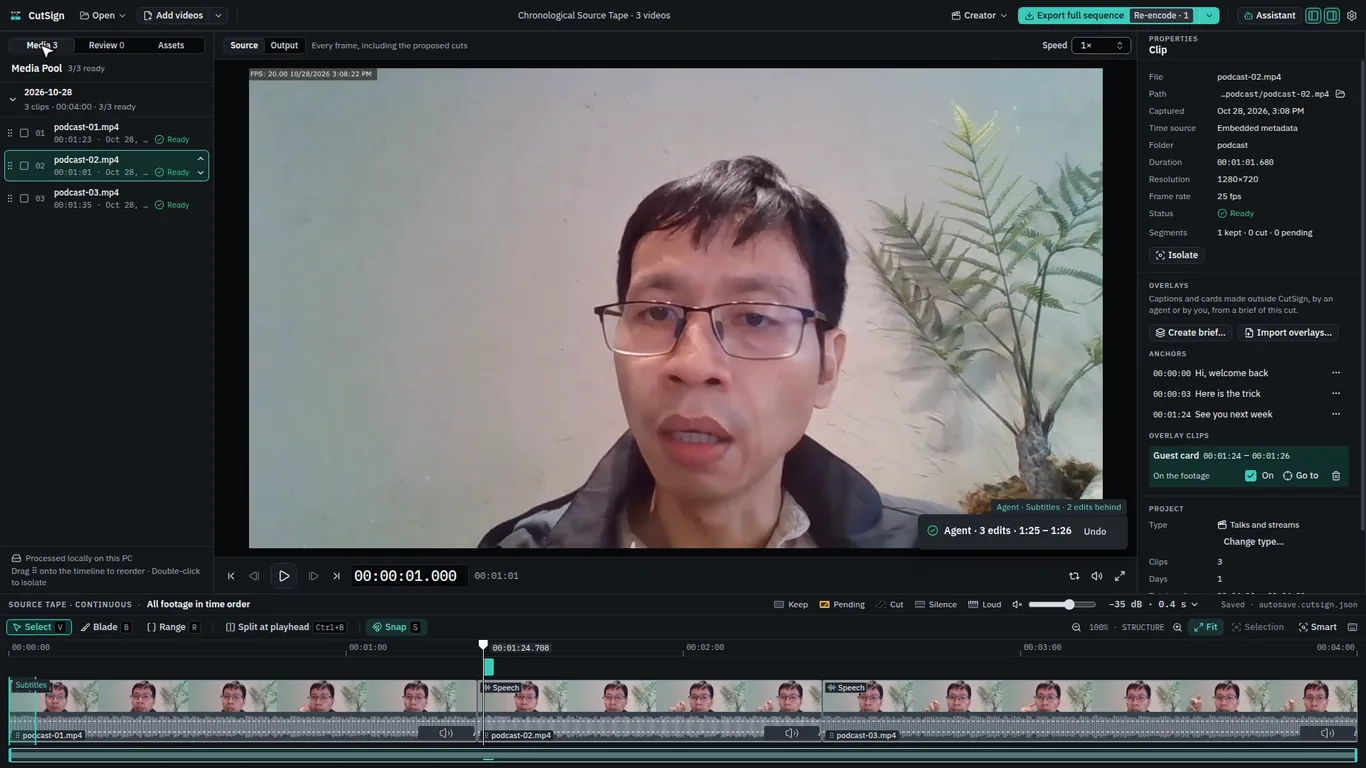
Read the MCP docs and the agent skillParts of the app as they are, not illustrations. Three podcast takes, four minutes in all: the analysis found no silence worth cutting, and an agent added three subtitle lines and one overlay.
Timeline. Every clip in order. Amber is a proposal waiting for you; the lane above holds overlays an agent or you added.
Review card. Keep and Confirm cut have the same weight. Pending looks unfinished on purpose.
Progress. Counts and time left, never a bare spinner. Cancel and resume any time.
Export gate. Locked while anything is pending, so no cut reaches your video unseen.
Decide the 5 pending cuts to unlock export.
The questions people ask first, answered as plain facts.
If you record more than you keep, and you already have an agent for everything else, it is for you.
Try every feature free for 7 days. No subscription after that, and no credits ever.
For your own footage, on up to two of your PCs.
Perpetual use of the major version you buy.
Includes:
Commercial use on one device, with priority support.
Includes 12 months of priority support.
Everything in CutSign, plus:
Commercial use on five devices in one purchase.
Works out at $99.80 per device.
Everything in Business, plus:
Prices in USD. Microsoft Store: the same $49.99, paid through your Microsoft account. Business licenses are sold direct only. Checkout: [checkout]
Every feature and real exports, no watermark. After the trial your projects still open; new scans and exports need a license.
Same price. Trial, purchase and updates go through your Microsoft account.
macOS: later. No date yet.
System requirements: [to fill]
The MCP server needs the unzipped app or the installer, not the portable .exe.
No. Analysis and export run on your PC, nothing is uploaded, and CutSign works offline.
No. Files are read in place — never moved, renamed or changed. Every export is a new file.
Your projects still open and you can review earlier results. Starting new scans or exports needs a license.
When cut points land on keyframes and the clips share one format, export copies the video without re-encoding. Otherwise it re-encodes the kept parts and tells you which cut caused it.
Any MCP client: Claude Code, Codex, Cursor, Gemini CLI. Setup is one command; the docs and the agent skill are public on GitHub.
CutSign does not. Your agent talks to the app over a local pipe; whether the agent itself calls a model online is between you and your agent.
No. Export, deleting sources and arbitrary file access are not exposed to agents on purpose. Agents edit the timeline; you export.
Export an EDL today. The project file itself is documented, so scripts can convert it; OpenTimelineIO export is planned.
Anything FFmpeg reads. The tested list is being written. [format list]
CutSign is not forensic software and makes no claim about admissibility in court.
No. You pay once and keep the major version you bought, with its updates. A future major version may be a paid upgrade; yours keeps working either way.
[refund policy]
Later. There is no date yet.